Introduction
Most organizations invest heavily in video content—training modules, explainer videos, product demos—without asking a simple question: can someone who can't see the screen understand what's happening?
For the roughly 7 million Americans living with vision impairment, including 1 million who are blind (according to the CDC), video content without audio description is effectively inaccessible. That's not just an equity problem. It's a compliance risk under WCAG, ADA, and Section 508, and it shrinks your audience.
This guide addresses that gap directly. It covers what audio description is, who needs it, what the law actually requires, the different delivery methods, how to create it, and the writing and recording practices that separate good AD from great AD.
Key Takeaways
- Audio description narrates essential visual content so blind and low-vision viewers can fully follow video
- WCAG 2.x Level AA (SC 1.2.5) mandates audio description for pre-recorded synchronized video
- Four delivery methods exist: integrated description, separate audio track, WebVTT file, or a described video version
- The simplest and most cost-effective approach is building descriptions into the script before production begins
- A quick test: close your eyes—if you miss anything critical, your video needs audio description
What Is Audio Description for Video?
Audio description (AD) is narrated description of meaningful visual information added to a video's soundtrack. During natural pauses in dialogue, a narrator describes what's happening on screen—actions, scene changes, on-screen text, speaker identities, graphics—so viewers who can't see the screen can follow the content completely.
The same feature goes by several names:
- Audio description (most common in the US)
- Video description (used by some broadcasters)
- Described video (common in Canada)
- Visual description (used in some academic and accessibility contexts)
What AD Does and Doesn't Cover
Audio description isn't a summary of everything on screen. It's selective by design — and knowing the difference between what to include and what to skip is where most organizations stumble.
Describe:
- On-screen text (titles, labels, URLs, data values)
- Key actions and demonstrations not obvious from the audio
- Speaker names and identities when not introduced verbally
- Visual transitions or scene changes that affect understanding
Don't describe:
- Decorative or background visuals that don't carry meaning
- Anything already conveyed clearly through the existing audio
- Interpretations, emotional judgments, or assumptions about intent
The guiding principle: if a listener could already infer it from the audio, leave it out.
Who Benefits from Audio Description?
The most direct beneficiaries are people who are blind or have low vision. Without AD, they may follow a narrator's voice but miss the diagram being discussed, the label on a chart, or the on-screen text that provides critical context.
That said, the audience for AD extends well beyond visual impairment.
Additional audiences who benefit:
- People with certain cognitive or learning disabilities, who gain from verbal reinforcement of visual concepts — a 2025 reception study found AD improved comprehension for students with lower cognitive processing levels
- Learners working through dense corporate or eLearning content, where visual information is layered
- Employees watching instructional video in the background while completing a hands-on task
- Anyone consuming video without a screen — commuting, multitasking, or using a screen reader
For L&D and HR teams producing training, onboarding, or benefits communications, the implication is practical: if your video relies entirely on visuals to carry the message, part of your audience won't get the full picture — regardless of their vision status.
Audio Description Compliance: WCAG and Legal Requirements
What WCAG Requires
The Web Content Accessibility Guidelines are the international standard for digital accessibility. Three criteria address audio description directly:
| WCAG Criterion | Level | Requirement |
|---|---|---|
| 1.2.3 | A | Audio description or a descriptive transcript for pre-recorded synchronized video |
| 1.2.5 | AA | Full audio description for all pre-recorded synchronized video |
| 1.2.7 | AAA | Extended audio description when existing pauses are insufficient |
Most compliance targets are set at Level AA, which means SC 1.2.5 applies—full audio description, not just a transcript workaround.
The ADA and Federal Enforcement
The ADA doesn't name audio description explicitly, but the legal picture has grown clearer. Key enforcement rules and deadlines include:
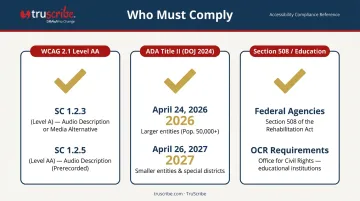
- ADA Title II (DOJ, April 2024): State and local government entities must meet WCAG 2.1 Level AA—including SC 1.2.5—with deadlines of April 24, 2026 for larger entities and April 26, 2027 for smaller ones. (Full rule)
- Section 508 (Federal Agencies): Standard E205.4 incorporates WCAG 2.0 Level A and AA, mapping pre-recorded synchronized media to SC 1.2.3 and SC 1.2.5.
- Education (Section 504 / ADA Title II): The Department of Education's Office for Civil Rights explicitly lists video and audio description as digital-access requirements for educational institutions.
When AD Is Not Required
Not every video needs audio description. If a video shows only a person speaking directly to camera with no additional visual content—no slides, no on-screen text, no graphics or demonstrations—AD isn't necessary.
A quick test: close your eyes and listen to the video. If you miss anything critical to understanding the content, audio description is needed.
Types of Audio Description: Which Method Is Right for You?
There are four delivery methods, and the right one depends on whether the video is new or existing, how much audio space is available, and what your media player supports.
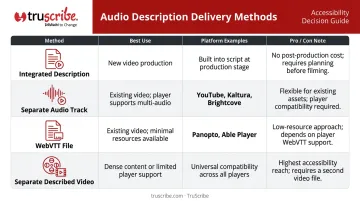
Integrated Description
Descriptions of visual content are written directly into the speaker's or narrator's script during production. The narrator naturally speaks what they're showing—"as you can see in this chart, Q3 revenue increased by 22%" becomes part of the script from day one.
This is the most cost-effective method because it requires no post-production work. It works especially well for training videos, explainer videos, and instructional content. Organizations that build description into the script from the outset avoid the cost of retrofitting it later.
Separate Audio Track
A second audio track containing only narrated descriptions is recorded, synchronized with the existing video, and offered alongside the original audio. Viewers can toggle it on or off through the media player.
This requires player support for multiple audio tracks. Platforms that support it include:
- YouTube
- Kaltura
- Brightcove
Configuration requirements vary by platform, so check your player's documentation before choosing this approach.
Text-Based Description (WebVTT File)
Descriptions are written as a timed text file (WebVTT format) synchronized with the video. A compatible media player renders them as spoken descriptions at the appropriate timestamps.
This method requires no re-recording and minimal production resources. Panopto and Able Player both support this approach. One important caveat: WebVTT format support doesn't automatically mean spoken AD—the player must implement it as audio output.
Separate Described Video
A second complete version of the video is produced with description audio baked directly into the file. This is necessary when the media player can't support separate audio tracks, or when descriptions are too long to fit within existing audio pauses (the extended audio description scenario).
Choosing the Right Method
| Situation | Recommended Method |
|---|---|
| New video in production | Integrated description |
| Existing video, player supports multi-audio | Separate audio track |
| Existing video, player supports WebVTT | Text-based description |
| Dense visual content, insufficient audio pauses | Separate described video |
| Player supports nothing extra | Separate described video |
How to Create Audio Description for Your Videos
Step 1 — Assess the Need
Listen to your video with eyes closed. Note every moment where critical visual information—on-screen text, demonstrated actions, graphics, speaker names—isn't communicated through the audio. Rate the gap as high, medium, or low priority.
Videos with dense visual content (data visualizations, multi-step demonstrations, on-screen diagrams) typically require the most work.
Step 2 — Write the Descriptions
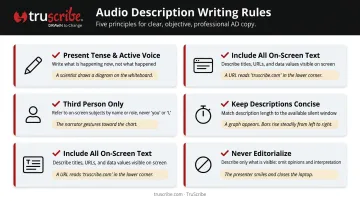
Good AD writing follows consistent rules:
- Use present tense and active voice: "A bar chart appears showing three-year revenue growth."
- Stay in third person: Describe what's visible, not your interpretation of it.
- Include all on-screen text: Titles, labels, URLs, speaker names, data values.
- Keep descriptions concise: They must fit within the available audio pause.
- Never editorialize: Describe what's there, not what it means.
The DCMP Description Key is a publicly available, citable reference guide that covers exactly what to describe, how to handle on-screen characteristics, and voicing standards.
Step 3 — Produce and Deliver the AD
With your descriptions written, the next step is choosing a delivery format and producing the final output. Each method suits different platforms and production workflows:
- WebVTT file: Write timed descriptions in a
.vttfile. Timestamps must align with the exact frame of the visual they describe. - Separate audio track: Record descriptions with a voice clearly distinct from the main narrator, then sync the audio file with the video in your media platform.
- Full described video: Combine the original and description audio files. Use "ducking" (temporarily lowering background audio) during descriptions. If descriptions are too long for existing pauses, extend the relevant scene lengths to fit the descriptions.
Platforms and Tools for Audio Description
Choosing the right platform and production partner shapes how smoothly audio description fits into your workflow. Here's where to start.
Platform support at a glance:
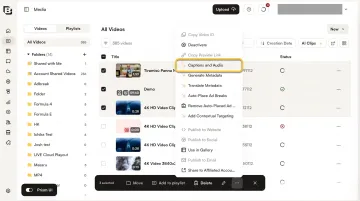
- YouTube: Supports AD as an alternative audio track via YouTube Studio's Languages section—available to creators with multi-language-audio access
- Panopto: Supports timed text descriptions via WebVTT file upload; viewers activate them through an AD control
- Kaltura: Exposes multiple audio tracks in the player with viewer selection; multi-audio VOD may require transcoding configuration
- Brightcove: Supports multiple alternate audio tracks, including descriptive audio, through its Dynamic Delivery system
- Able Player: Open-source HTML5 player with full support for both WebVTT text descriptions and separate described-video versions
Once you know your platform, the next decision is whether to produce AD in-house or bring in a specialist. These vendors handle production end to end:
For outsourcing AD production:
- 3Play Media offers standard and extended AD with human involvement and platform integrations
- Verbit provides human-expert and AI-assisted AD for video, education, and live events
- Automatic Sync Technologies handles both standard and extended AD scenarios
When evaluating vendors, ask specifically about turnaround time, quality review process, and whether they handle synchronization with your media platform.
Best Practices for Writing and Recording Audio Description
Writing
- Describe only what's observable—not what you think the speaker intends
- Prioritize on-screen text first; it's the most frequently overlooked category
- Avoid spoiling narrative moments by describing outcomes before they occur in the video
- For complex data visualizations or dense training graphics, consider providing a separate accessible companion document rather than cramming everything into brief pauses
Recording
- Use a voice clearly distinguishable from the main narrator—different in pitch or quality, not just volume
- Maintain a neutral, even tone throughout; don't convey emotion or weight through vocal inflection
- Time descriptions to begin at or slightly before the visual they're describing, never after it appears
Quality Check
After adding AD, have someone who hasn't seen the video listen to the described version with eyes closed. If they can follow the content completely, your AD is working. Questions like "what does that diagram show?" or "who's speaking now?" point directly to gaps worth closing.
Once the content passes that test, shift focus to discoverability. Confirm the described version is properly linked or labeled everywhere the original video lives—your LMS, your website, your intranet. A well-crafted AD track still fails its audience if people can't locate it.
Frequently Asked Questions
How do you audio describe a video?
Audio describing a video means identifying moments where critical visual information isn't conveyed through dialogue, then writing concise descriptions of what's on screen. Those descriptions are delivered as part of the original script, a separate audio track, or a timed WebVTT file synchronized with the video.
What is the difference between audio description and subtitles?
Subtitles and captions are text versions of spoken dialogue and sound effects, designed for viewers who are deaf or hard of hearing. Audio description is spoken narration of visual content, designed for viewers who are blind or have low vision. They address different access needs and can—and often should—be used together.
Where can I watch movies with audio description?
Netflix, Hulu, Disney+, Amazon Prime Video, HBO Max, and Apple TV+ all support audio description on a growing library of titles. Look for the AD option in your audio or language settings—availability varies by title and device.
Is audio description required by law?
For most U.S. organizations, yes. WCAG 2.1 Level AA—required under the ADA, Section 508, and the DOJ's 2024 Title II rule—mandates audio description for pre-recorded video containing visual-only information. Government entities, educational institutions, and businesses with public-facing video all have real compliance obligations.
What is the difference between standard and extended audio description?
Standard audio description fits descriptions within the natural pauses already in the video's audio. Extended audio description requires pausing the video to allow time for a longer description—used when the visual content is dense and existing gaps in dialogue aren't long enough to accommodate what needs to be described.