These terms get used interchangeably, but they describe fundamentally different approaches to visual communication with different production workflows, cost structures, and audience impacts. Choosing the wrong format doesn't just create vendor confusion — it can result in content that fails to achieve the engagement or retention outcomes you built it for.
This guide draws a clear line between motion graphics and animation, explains where each format excels in B2B contexts, and gives you a practical framework for choosing the right one.
Key Takeaways
- Motion graphics = animated graphic design (shapes, text, icons, data) built for message clarity
- Animation = the broader medium encompassing storytelling, character-driven, and emotionally expressive formats
- Use motion graphics to inform quickly; use animation when you need to build understanding and drive long-term retention
- Whiteboard animation bridges both — delivering sequential clarity and narrative engagement in one format
- Match your format to your communication goal — the right choice becomes clear once you know what you need your audience to do
What Is Motion Graphics?
Adobe defines motion graphics as moving graphic design — animated typography, shapes, icons, and data visualizations that create an illusion of motion. It's a subset of animation, but treated as its own discipline focused on design clarity rather than storytelling.
Core Characteristics
Motion graphics are typically:
- Abstract — no characters, no narrative arc
- Brand-aligned — built around visual identity systems
- Modular — designed to function across multiple formats and platforms
- Information-forward — the visual exists to serve the data or message, not the other way around
The production workflow reflects this: motion graphics usually begin with static style frames (fully designed stills) before animation starts. Strong graphic design fundamentals have to be in place first, which affects both timeline and vendor selection. You're hiring a motion designer, not an animator.
B2B Use Cases for Motion Graphics
Motion graphics deliver strong results when the goal is to communicate information quickly and clearly:
- Animated infographics and data reports
- Product feature explainer videos
- Social media ads and brand assets
- Onboarding walkthroughs with UI demonstrations
- Presentation assets and animated lower-thirds
Where Motion Graphics Fit in B2B Workflows
In practice, motion graphics show up most often in:
- Product launches — feature walkthroughs, demo highlights
- Sales enablement — animated slides, data callouts
- Compliance overviews — visual summaries of policies or regulatory frameworks
- Training modules that summarize a process rather than teach one
Because motion graphics don't rely on characters or narrative continuity, they're faster to revise and easier to localize — a meaningful advantage for teams managing multilingual rollouts or content that changes quarter to quarter.
What Is Animation?
Animation is the broader medium. It encompasses any technique that makes still images or objects appear to move — covering a far wider range of styles and purposes than motion graphics alone. Motion graphics is one category within it, not a synonym for it.
Four Main Animation Types in B2B
| Type | Description | Typical B2B Application |
|---|---|---|
| 2D / Traditional | Frame-by-frame or rigged character movement; illustrated scenes and environments | Narrative explainers, brand storytelling |
| 3D / CGI | Three-dimensional digital models with lighting, rendering, and rigging | Product visualization, technical demos |
| Stop Motion | Physical objects photographed incrementally | Creative brand campaigns (less common in B2B) |
| Whiteboard Animation | Progressive hand-drawing narrated as a story | Training, onboarding, complex concept explanation |
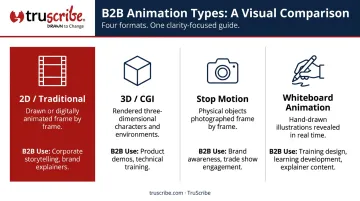
Note: Adobe actually lists five animation styles, adding computer animation as a distinct category. The four-type grouping above is a practical simplification, not a settled universal taxonomy.
Why Animation Is More Effective for Retention
Animation uses pacing, timing, and story structure to shape how viewers understand and feel — not just what they see.
Research published in IEEE Transactions on Visualization and Computer Graphics found that consistent sequencing in narrative visualizations significantly improved memory for presentation order, with results showing p = .002 for parallel sequencing versus reversed sequences. Sequence structure helps audiences build a mental model, not just absorb individual facts.
A 2023 study by Schneider et al. found that progressive drawing — the mechanism at the heart of whiteboard animation — improved both immediate retention improved both immediate retention (F(1,129) = 25.72, p < .001) and transfer across two separate experiments. Narrative context alone, without the progressive drawing, did not produce the same effect.
Whiteboard Animation: The Middle Ground
That finding points directly to why whiteboard animation occupies a unique position. It uses sequential drawing and narrative flow — which classifies it firmly as animation — but its information-forward approach also delivers the clarity advantages typically associated with motion graphics.
TruScribe's Scribology methodology is built on this principle. Instead of treating whiteboard animation as a stylistic choice, Scribology structures each video around specific cognitive science principles:
- Sequential drawing that guides viewer attention incrementally
- Minimalist design that reduces cognitive load
- Visual anticipation created by watching content appear in real time
Across more than 5,000 delivered projects for clients including Microsoft, Medtronic, and Fidelity, this approach has produced a 2.3x higher retention rate compared to traditional video formats and an average 35% increase in conversion rates.
Motion Graphics vs. Animation: Key Differences at a Glance
| Dimension | Motion Graphics | Animation | |-----------|----------------|-----------|| | Primary Purpose | Communicate information visually and clearly | Tell a story, build understanding, drive emotional connection | | Storytelling | Minimal to none — design-led | Central — narrative or character-driven | | Visual Style | Abstract shapes, text, icons, data | Characters, illustrated environments, physical objects | | B2B Use Cases | Data explainers, product demos, brand assets | Training programs, onboarding, change management | | Production Complexity | Moderate — design-intensive upfront | Varies widely by format; generally higher for character/3D | | Relative Cost | Generally lower than character or 3D animation | Higher for character/3D; whiteboard animation is often cost-competitive |
The clearest way to frame the relationship: motion graphics brings design to life to clarify a message. Animation brings a story or concept to life to build understanding and emotional connection. The right choice comes down to what you're asking the format to do — inform quickly, or build lasting comprehension.
One misconception worth addressing: animation isn't synonymous with cartoons. The medium spans a wide spectrum, and many formats — including whiteboard animation — are specifically designed for professional, corporate audiences. The UK Government uses animation to explain the Procurement Act to contracting authorities.
Which Should You Choose for Your B2B Content?
The decision should start with your communication goal, not the format label.
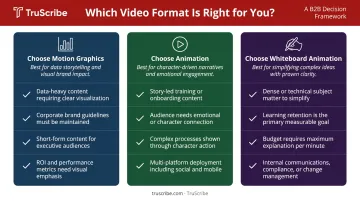
Decision Framework
Choose motion graphics when:
- The primary goal is to visualize data or demonstrate a product feature
- You need quick brand recognition assets (social ads, logo reveals, presentation elements)
- Content needs to be modular, easily updated, or localized frequently
- The audience already understands the concept — you're reinforcing, not teaching
Choose animation when:
- The goal is to explain a complex, multi-step concept from scratch
- You need to drive behavioral change (compliance, safety, process adoption)
- Long-term retention is a success metric (training, onboarding, certification)
- The message needs emotional resonance to motivate action
Consider whiteboard animation when:
- You need both sequential clarity and narrative engagement in one format
- The subject matter is abstract, technical, or high-stakes
- You're working in employee training, change management, or benefits communication
- Cost-to-impact ratio matters — whiteboard animation delivers strong retention outcomes without the production overhead of character or 3D animation
The Hybrid Approach
Many effective B2B videos layer motion graphics and animation together — opening with animated brand graphics, then transitioning into a narrative or whiteboard sequence. This works when both elements are planned together from the start. Splicing motion graphics and animation styles in post-production usually shows, and viewers notice the disconnect before they process the message.
A Note on Budget and Timeline
Costs vary significantly across formats, driven by a different set of production variables in each case:
- Motion graphics costs are driven by the number and complexity of graphic assets, 2D vs. 3D treatment, and revision rounds
- Character and 3D animation costs scale with character count, scene complexity, rigging, and rendering
- Whiteboard animation costs vary by drawing volume, narrative complexity, and narration requirements
TruScribe's bulk minutes packages for whiteboard animation range from $1,625 to $2,300 per minute depending on volume, with 20-working-day standard turnaround.
Conclusion
Motion graphics and animation aren't competing formats. They're different tools for different communication jobs. The right format depends on what you need your audience to understand, feel, or do after watching.
A quick reference:
- Motion graphics: best for data visualization, brand assets, and product demos where clarity and speed matter
- Animation (including whiteboard): best for training, onboarding, and change management where retention determines success
The format should always serve the message. Choose based on what your audience needs to walk away knowing — and your results will follow.
Frequently Asked Questions
What are the 4 types of animation?
The four types most commonly referenced are 2D/traditional animation, 3D/CGI, stop motion, and whiteboard animation. Adobe also includes computer animation as a fifth category, so treat this as a practical simplification, not a definitive list.
What is an example of motion graphics?
Common examples include an animated infographic in a product overview video, a logo reveal at the start of a corporate presentation, or animated text callouts highlighting key statistics in a data summary. These all involve moving graphic design elements rather than characters or narrative sequences.
Is whiteboard animation a type of motion graphics or animation?
Whiteboard animation is a form of animation, not motion graphics. It uses sequential drawing and narrative flow to guide the viewer through a concept, which is fundamentally different from animating static design elements. Its mechanism is storytelling and progressive reveal, not graphic design in motion.
Which is better for corporate training videos — motion graphics or animation?
Animation (including whiteboard-style) tends to outperform motion graphics for training because narrative structure and sequential visual reveals improve how information is encoded and retained. Motion graphics are better suited for quick reference or data-heavy summaries where the audience is reinforcing knowledge rather than learning something new.
Is motion graphics more expensive than animation?
Motion graphics is generally less expensive than character or 3D animation, though costs vary widely by complexity. Whiteboard animation, for instance, can be cost-competitive with motion graphics while producing stronger retention outcomes for training and communication content.
Can motion graphics and animation be combined in one video?
Yes, and hybrid videos are common in B2B contexts. A typical approach opens with animated brand graphics and then transitions into a narrative or whiteboard sequence. The key is planning both elements together from the start — not assembling them in post-production — so the tonal and visual logic holds throughout.