Introduction
The window between a customer signing a contract and reaching their first meaningful outcome is where B2B loyalty is built or lost. Get them to value quickly, and you earn the right to grow the account. Let them stall, fumble through documentation, or wait days for a response, and you've already started losing them—before they've experienced what they paid for.
Video has become the medium Customer Success, L&D, and HR teams rely on most to close that gap. And the preference is clear: according to TechSmith's 2024 international study, 83% of professionals prefer watching video to consume instructional content at work, compared to 41% who choose text.
Yet most onboarding video programs underperform—not because teams lack effort, but because they lack structure. Long, unedited recordings. Feature-dump walkthroughs. Disconnected tutorials dumped into a shared folder. The format and sequencing are wrong, so even good content fails to guide customers forward.
This guide gives B2B teams a practical framework for building a video-based onboarding system—covering which video types to use, how to sequence them, and how to structure content so customers move from signup to success without stalling.
Key Takeaways
- Customer onboarding videos work best as a sequenced system—welcome, core walkthroughs, feature tutorials, and ongoing support
- Format shapes comprehension—B2B products need visuals that reveal complexity in layers, not all at once
- Each video should have one objective and deploy at the right moment in the customer journey
- Measure success through activation milestones, support ticket reduction, and retention—not view counts
- Consistent tone and structure reduces support burden and builds customer confidence faster
When Should You Use Customer Onboarding Videos?
Onboarding videos aren't just for day one. Conflating a signup-moment orientation with a 30-to-90-day onboarding program is one of the most common reasons teams end up with an underbuilt system.
Orientation vs. onboarding—they're different:
- Orientation (day 1): Sets expectations, introduces the team, and explains what happens next
- Onboarding (days 1–90): Progressively guides customers through workflows, capabilities, and advanced use cases as they ramp up
Video outperforms text or live calls in specific scenarios:
- You're delivering the same information repeatedly to different customers
- The product involves non-obvious workflows that require visual demonstration
- Your customers are geographically distributed across time zones
- Customers need to pause, rewatch, and reference instructions on their own schedule
Where video is commonly misused:
Teams often record a single 45-minute walkthrough that covers everything—and call it onboarding. That approach creates confusion, not confidence. Customers can't find what they need, can't rewatch specific steps, and end up submitting support tickets for things the video already covered. Structure is what's missing—not content.
What You Need Before Creating Customer Onboarding Videos
Most onboarding video libraries fail before recording starts — not because of poor production, but because of poor planning. Before recording a single frame, get these prerequisites in order.
Define the Outcome First
Every onboarding video should be built backward from one question: What should the customer be able to do after watching this?
Without a specific, observable behavior as the target, videos become information dumps. "Understand the platform" isn't an outcome. "Complete their first project setup" is.
Map Your Content and Delivery Infrastructure
Once outcomes are defined, you need:
- A customer journey map with identified friction points—where customers typically stall or reach out for support
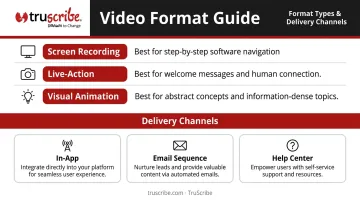
- A format decision based on content complexity:
- Screen recordings for step-by-step software navigation
- Live-action for personal welcome messages and human connection
- Visual animation (such as whiteboard-style explainers) for abstract concepts, multi-layered processes, or information-dense topics where cognitive load is a concern
- A hosting and delivery plan that specifies how videos surface—in-app, via email sequence, embedded in a help center, or triggered by CRM behavior
With your content and delivery infrastructure mapped, the final layer is making sure the right people and processes are in place.
Team and Process Requirements
- A basic script or outline for each video before production starts
- One named owner accountable for accuracy and updates
- Agreed-upon tone and brand standards so the series feels consistent from video to video
Types of Customer Onboarding Videos
A complete onboarding video program isn't one video—it's a system of connected assets, each serving a distinct purpose.
Welcome Videos
The first touchpoint after signup or contract signing. Keep them under 90 seconds, feature a real person from the account team, and do three things: acknowledge the customer's decision, set clear expectations for the onboarding period, and give one specific next step. This is not the place for product instructions. It's the place to make customers feel like they made the right choice.
Skipping or automating this step entirely is a common mistake. Even a simple recorded message from a real account owner builds disproportionate trust in the early relationship.
Product Walkthrough Videos
These are goal-based tours, not feature inventories. Focus exclusively on the two or three core workflows a customer must complete to reach their first meaningful win. The question driving every decision in a walkthrough video is: what does this customer need to do to see value?
Keep walkthroughs targeted to one task at a time. A video that tries to cover "the whole platform" in one go is a video that teaches nothing.
Feature-Specific Tutorial Videos
Short, modular videos—ideally under three minutes—covering a single task or capability. The key design principle: organize by user goal, not by product menu structure. A customer searching for "how do I export a report" should find that video immediately, not scroll through a product-navigation-based library.
These videos are easier to update, easier to search, and easier to act on when they're tightly scoped.
FAQ and Troubleshooting Videos
These replace your most commonly repeated support interactions. When customers can resolve basic issues without contacting your team, everyone wins—customers get faster answers, and your CS team gets time back for complex account issues.
A 2025 Forrester Consulting study commissioned by Zendesk modeled a 25% reduction in contact rate for enterprises with robust self-service capabilities. Video-based FAQs are a direct contributor to that kind of deflection.
Concept and Process Explainer Videos
For complex B2B products—particularly in healthcare, financial services, or manufacturing—customers often need to understand why a process works a certain way before they can confidently use it. This is where format selection has the biggest impact.
Research supports the case for sequential visual formats: a meta-analysis of 56 studies found that segmented multimedia produced measurable improvements in retention (d = 0.32), transfer (d = 0.36), and cognitive load compared to continuous presentation. Revealing information in a controlled, purposeful order gives the brain time to process each concept before the next arrives.
That's the principle behind TruScribe's Scribology methodology: hand-drawn sequential visuals that guide attention precisely, reduce cognitive overload through minimalist design, and build mental models step by step.
For enterprise onboarding programs where customers must retain complex product, policy, or procedural information, this format directly applies those research-backed advantages—making it a stronger choice than static slides or screen recordings of dense interfaces.
How to Build Your Customer Onboarding Video Strategy Step-by-Step
Effective onboarding video programs follow a defined sequence tied to the customer journey. Delivering everything at once, or skipping phases, undermines the system and accelerates early churn.
Step 1: The Welcome Experience
A strong welcome video includes:
- A genuine acknowledgment of the customer's decision to work with you
- A brief introduction to who they'll work with during onboarding
- A plain-language overview of what the onboarding period looks like
- One clear next step—a link, a scheduled call, or a checklist item
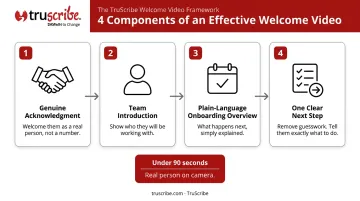
Length: under 90 seconds. Format: a real person on camera. This is not the place for animation or screen recording. The goal is human connection, not instruction.
Step 2: Core Workflow Walkthroughs
Identify the two to four actions a customer must complete to reach their first win. Sequence them from most foundational to most complex, and create one video per action.
Delivery options depend on your support model:
- In-app tooltips or embedded players for product-led growth models
- Email sequences triggered by signup or kickoff completion
- Shared during a kickoff call for high-touch enterprise accounts
Match the delivery channel to where your customers already spend their time.
Step 3: Feature Tutorials and Advanced Use Cases
Once customers have completed the core workflow, onboarding shifts from activation to value deepening. Feature tutorial videos at this stage should be:
- Organized by role or goal, not by product menu
- Surfaced based on what the customer has or hasn't done in the product—not sent in bulk
CRM and product usage data are your best tools here. Whether you're using behavioral triggers in a customer success platform or targeted recommendations from a CSM, relevance is the goal—not volume.
Step 4: Proactive Support and Ongoing Engagement
Onboarding doesn't end at day 30. The video delivery model should shift from sequential guidance to a combination of reactive support and proactive engagement:
- FAQ and troubleshooting videos surface when customers hit known friction points
- New feature announcements keep engaged customers informed without requiring a live call
- Periodic check-in assets (short videos from the account team) maintain the human connection
Monitor which videos customers are not watching. Gaps in video engagement frequently indicate where the onboarding experience is breaking down—and whether the fix is better content or a personal follow-up from the CS team.
Best Practices for Effective Customer Onboarding Videos
One Video, One Objective
The most common production mistake is covering too much in a single video. A tightly scoped video is easier to update, easier for customers to search, and far more likely to drive the specific action you need.
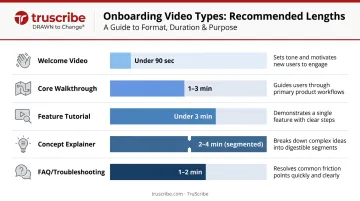
Practical length guidelines:
| Video Type | Recommended Length |
|---|---|
| Welcome video | Under 90 seconds |
| Core walkthrough | 1–3 minutes |
| Feature tutorial | Under 3 minutes |
| Concept explainer | 2–4 minutes (segmented) |
| FAQ / troubleshooting | 1–2 minutes |
Match Format to Content Complexity
Screen recordings work well when following along on-screen is sufficient for the task. But when content involves abstract concepts, multi-step processes, or information that would overwhelm if shown all at once, a format that controls what the viewer sees—and in what order—is worth the investment.
Sequential visual formats (like TruScribe's hand-drawn whiteboard approach) reduce cognitive load by presenting one idea at a time, in a logical order, without visual clutter competing for the viewer's attention. For B2B products in regulated industries or complex workflows, that format difference directly determines whether customers retain what they've learned—or need to ask support.
Build for Updates, Not Replacement
Modular video design means only the affected video needs to be re-recorded when a workflow changes—not the entire series. Keep source files organized, use version labels, and assign one owner per video responsible for flagging when content is outdated.
That same discipline—keeping each video focused and maintainable—applies to how you close them. A well-maintained library loses its value if viewers don't know what to do next.
End Every Video with a Next Step
Without a clear call to action, videos become informational rather than operational. Every video should end with one of these:
- A link to the next video in the sequence
- A prompt to complete a checklist item in the product
- Direct contact options for the account manager or support team
Measure What Actually Matters
View counts are a vanity metric. The metrics that reveal whether onboarding videos are working:
- Activation milestones completed by customers who watched vs. those who didn't
- Support ticket volume before and after deploying FAQ/troubleshooting videos
- Time-to-first-value across cohorts
For a concrete benchmark: Gainsight reported reducing average customer implementation time from 13 weeks to 4 weeks—a 66% decrease—after redesigning their onboarding process. The same principle applies to video: structure and intentionality compound. Each video that answers a question before it becomes a support ticket shortens implementation time and frees your team for higher-value work.
Conclusion
Building an effective customer onboarding video program comes down to structure, sequencing, and alignment with what the customer actually needs to accomplish. A clear system of short, purposeful videos — each with one objective, deployed at the right moment — consistently outperforms a single comprehensive recording.
Treat your onboarding videos as living assets. Review them when workflows change, audit them quarterly, and measure their impact against the outcomes that matter:
- Retention rates — are customers staying through the critical early window?
- Activation completion — are users reaching the moments that signal real adoption?
- CS team capacity — is your support volume dropping as video coverage improves?
Teams that build this habit stop reacting to early churn and start investing that time in accounts already seeing results.
Frequently Asked Questions
What makes a good onboarding video?
A good onboarding video has one clear objective, guides the viewer toward a specific action, and stays tightly focused. Format should match the complexity of the content—screen recordings for simple navigation, visual animation for abstract or information-dense concepts.
How long should a customer onboarding video be?
Welcome videos should be under 90 seconds. Core walkthroughs typically run one to three minutes. Feature tutorials should stay under three minutes to maintain engagement. Anything longer should be broken into a series.
What types of customer onboarding videos should I create first?
Start with a personal welcome video followed by one or two core workflow walkthroughs that guide the customer to their first meaningful outcome. These two types directly address the highest early churn risk.
When should I use animation instead of screen recording for onboarding?
Screen recordings work well for straightforward software navigation. Use animation when content involves abstract concepts, multi-layered processes, or dense information—it lets you control precisely what the viewer sees and in what sequence, preventing overwhelm.
How do I measure whether my onboarding videos are working?
Compare video viewers against non-viewers on three metrics: time to complete activation milestones, support ticket volume, and retention at the 30- and 90-day marks.
How often should customer onboarding videos be updated?
Review videos whenever a product workflow or policy changes, and audit the full library at least quarterly. Modular design—one video per topic—makes this manageable, since only the affected video needs to be re-recorded.