
Text-heavy manuals, dense slide decks, and one-time classroom sessions share a common problem: they transfer information without reliably transferring understanding. "Video is better than text" gets repeated constantly, but what's rarely explained is why — and what specific business outcomes it actually drives.
This guide covers all of that. You'll find a practical definition of video in eLearning, its measurable advantages, what organizations risk by avoiding it, and how to structure video for maximum return.
Key Takeaways
- Video engages visual and auditory processing simultaneously, reducing cognitive load and boosting retention
- 69% of employees prefer video over written documents for learning a new skill
- One well-produced video trains thousands of employees consistently — replacing recurring instructor costs
- Video without deliberate structure fails — short, focused modules tied to specific objectives outperform long, general ones
- Tracking completion rates, knowledge check scores, and post-training error rates shows exactly where video is — and isn't — working
What Is Video in eLearning?
Video in eLearning is any audiovisual content embedded in or delivered through a digital learning environment — used to communicate a specific learning objective. That includes explainer videos, animated walkthroughs, screencasts, scenario-based videos, and instructional recordings.
In B2B contexts, it spans the full learning lifecycle:
- Employee onboarding — communicating culture, procedures, and role expectations
- Compliance and safety training — building accurate, lasting understanding of regulated requirements
- Product and technical knowledge — explaining complex tools, systems, or processes
- Change management — helping employees understand what's changing, why, and what's expected of them
- Soft skills development — demonstrating behavioral models through realistic scenarios
The goal is to increase comprehension, close knowledge gaps, and improve on-the-job performance. Video works when it's chosen and designed to produce those results — not simply because it exists in a course.
Key Advantages of Video in eLearning
The advantages below reflect measurable, operational impact: improvements organizations can actually track in knowledge retention, training efficiency, employee performance, and cost.
Higher Knowledge Retention and Comprehension
Video's most significant advantage is its effect on how well learners retain what they've been taught. When visual and auditory channels are engaged simultaneously, the brain can build richer, more durable mental models — a mechanism supported by Dual Coding Theory (Paivio) and Cognitive Load Theory (Sweller).
In practice, this plays out clearly: a learner who watches a well-structured procedural video retains the steps more reliably than one who reads the same content in a document. The effect is especially pronounced when information is revealed progressively rather than all at once. Research on signaling and cueing across 103 studies and 12,201 participants found that progressive visual cueing improved retention by g=0.53 — a meaningful effect that holds across learning contexts.
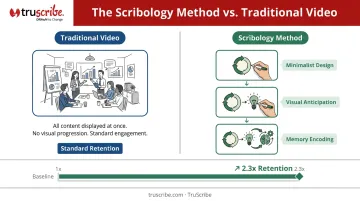
This is the principle behind TruScribe's Scribology method. Rather than displaying completed visuals, Scribology reveals content sequentially through continuous hand-drawn animation — directing the learner's attention with precision, one element at a time. The result is 2.3x higher retention compared to traditional video formats, driven by minimalist design, visual anticipation, and deeper memory encoding through hand-drawn imagery.
KPIs impacted:
- Knowledge check scores
- Error rates post-training
- Support ticket volume
- Re-training frequency
- Time-to-competency for new hires
When this matters most: High-stakes training where knowledge gaps carry direct business risk — compliance, safety, healthcare, financial services, and manufacturing.
Engagement and Attention Across a Distributed Workforce
Remote and distributed teams face a real attention problem. Without the social accountability of a classroom, learners multitask, skim, and drop off. Video addresses this more effectively than text or slides — not because it's inherently entertaining, but because it mirrors how employees already consume information outside of work.
According to Kaltura's State of Video in the Enterprise survey of more than 1,200 full-time U.S. employees at companies with 500+ staff, 69% prefer video over a written document for learning a new skill. That same survey also found 72% admitted to not giving training videos their full attention — a useful reminder that preference is not the same as completion.
Video works better than text for engagement — but only when it's designed to hold attention. Short, focused modules (more on length below), self-paced access, and content that shows rather than tells separate effective video training from background noise.
KPIs impacted:
- Course completion rates
- Learner satisfaction scores
- Time-on-task
- Repeat viewing rate (a proxy for points of confusion)
- Manager-reported skill application
Best suited for: Organizations with geographically distributed or deskless workforces — manufacturing, healthcare, retail, logistics — where live instructor-led sessions are impractical.
Scalability, Consistency, and Training Cost Reduction
Video's economic advantage is straightforward: produce it once, deploy it everywhere. A single well-produced video delivers identical instruction to 10 employees or 10,000, without proportionally increasing cost or instructor time. Every learner receives the same content — which is especially critical for compliance, where variability between sessions creates compliance risk.
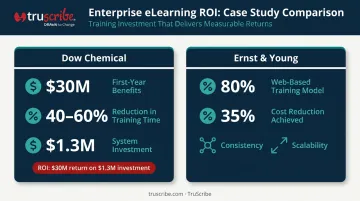
The numbers from enterprise eLearning deployments support this. Dow Chemical's web-based learning program — built around reusable, asynchronous content — reduced employee training time by 40–60% compared to classroom equivalents, with $30M in reported first-year benefits against a $1.3M system investment.
An academic review of corporate eLearning case studies found that Ernst & Young's shift to an 80% web-based training model reduced training costs by 35% while improving consistency and scalability. Video alone didn't drive those results — but both cases demonstrate what reusable digital content can do at scale.
Video is also faster to update than printed materials. When compliance requirements change or a product is updated, a targeted video revision is more efficient than reprinting and redistributing physical documentation — a compounding advantage .
KPIs impacted:
- Cost per learner trained
- Training hours consumed per employee
- Instructor time freed
- Content update turnaround time
- Standardization across departments and locations
Especially critical for: Rapidly scaling organizations, multi-location compliance training, and change management or system rollouts where consistency across a large population is non-negotiable.
What Happens When eLearning Lacks Video
Text-only and slide-heavy training programs share predictable failure modes:
- Inconsistent knowledge transfer — different facilitators deliver different quality; remote learners get less than in-room attendees
- High cognitive load : dense documents overwhelm working memory, particularly for complex procedural or regulatory content
- Low completion rates : when content isn't engaging, learners stop. Most of the training budget simply doesn't convert into behavior change
The downstream consequences are where the real cost lives. Employees who only read a safety protocol once retain less than those who watched it demonstrated step by step. Compliance content that was technically delivered but not actually understood still generates violations.
New hires who didn't build clear mental models during onboarding take longer to reach full productivity, often requiring re-training that costs more than the original investment.
Those real-world costs are compounded by design failures. A 2023 review of multimedia learning research found that adding narrated and on-screen text simultaneously can actively increase cognitive load, meaning poorly designed "enhanced" text-based training can perform worse than plain text. Video without intentional structure doesn't solve the problem — it can deepen it.
The real expense isn't the training budget. It's the safety incidents, compliance violations, and extended ramp times that follow when knowledge never transferred in the first place.
How to Get the Most Value from Video in eLearning
Video works best when deployed as part of a deliberate strategy — not as a drop-in replacement for a PDF.
Match Length to Attention
Research consistently points toward shorter modules driving higher completion. A survey of 385 full-time U.S. employees found that 58% were more likely to use online learning if content was divided into 5–7 minute lessons. For standalone eLearning modules, the practical range is 3–8 minutes. Complex topics should be broken into a series of focused modules rather than a single long video.
TruScribe's Scribology methodology is built around this constraint — every video is scoped to a single clear objective, with nothing included that doesn't serve the learner directly.
Match Format to Objective
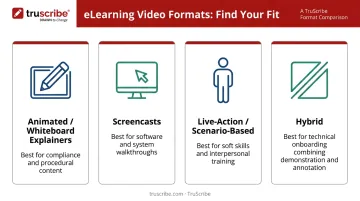
Not every training topic calls for the same type of video:
- Animated/whiteboard explainers — ideal for compliance, regulatory procedures, and technical concepts where step-by-step clarity is critical and visual noise must be eliminated
- Screencasts — most effective for software training and system walkthroughs, where seeing the interface in action is the point
- Live-action or scenario-based — works for soft skills, interpersonal situations, and role-play scenarios where human behavior is the subject
- Hybrid (live footage + illustration) — useful when authenticity and clarity both matter, such as technical onboarding that pairs real demonstration with annotated explanation
For complex B2B topics — regulatory requirements, system architecture, change management rationale — whiteboard animation is particularly effective. The format removes visual noise and guides attention step by step.
TruScribe has applied this approach for L&D teams at Walmart, Siemens, Medtronic, Fidelity, and Microsoft, across training challenges ranging from compliance comprehension to culture alignment at scale.
Track Outcomes and Update Regularly
Video delivers lasting value when treated as a living asset, not a one-time deliverable:
- Track completion rates, knowledge check scores, and post-training error rates
- Use LMS analytics to identify where learners drop off or replay content — both are signals that something needs to be fixed
- Schedule content reviews for compliance and product-related training on a defined cadence, not just when something breaks
- Refresh videos when procedures, regulations, or organizational context change
Strong initial production matters — but it's the ongoing performance review cycle that keeps training video programs accurate, relevant, and worth watching.
Conclusion
The case for video in eLearning is grounded in how the brain processes information and in the operational reality that training must be scalable, consistent, and retention-focused. Video addresses all three — but only when it's built with clear intent behind every decision.
Treat video as an ongoing strategic practice, not a one-time deployment. That means:
- Anchoring each video to a specific learning objective
- Keeping modules focused and short
- Reviewing performance data regularly
- Refreshing content as the organization evolves
Applied consistently, video doesn't just inform — it builds the kind of retention that holds up weeks after training ends.
Frequently Asked Questions
What types of video work best for eLearning?
Format selection depends on the learning objective. Animated or whiteboard-style videos work best for complex, procedural, and compliance content where step-by-step clarity matters. Screencasts suit software training, and live-action video fits scenario-based soft skills development. Varying formats across a curriculum further helps sustain engagement over time.
How long should eLearning videos be?
Research shows 5–7 minute lessons drive the highest employee engagement, with standalone modules ideally falling in the 3–8 minute range. Shorter, focused videos consistently outperform longer ones in both completion rates and retention. For complex topics, a series of short modules outperforms a single long video.
How does video improve knowledge retention compared to text?
Video engages both visual and auditory processing simultaneously — a mechanism supported by Dual Coding Theory. This reduces cognitive load and helps learners build more durable mental models than text alone. Sequential visual cueing (as in whiteboard animation) has been shown in a meta-analysis of 103 studies to produce meaningful retention improvements (g=0.53).
Is video in eLearning cost-effective for organizations with large workforces?
Yes. The one-time production cost of video is offset by eliminating recurring per-session expenses — instructor time, scheduling, logistics, and inconsistency between sessions. A single video can serve thousands of learners with identical quality, meaning cost-per-learner decreases as deployment scales.
What makes animated video particularly effective for complex training topics?
Animation — especially sequential whiteboard-style animation — removes visual noise and reveals information progressively, mirroring how the brain builds understanding one idea at a time. This makes abstract concepts tangible without overwhelming working memory, which is especially valuable for compliance, technical, and process-heavy training.
How do you measure whether video in eLearning is actually working?
Track course completion rates, knowledge check scores before and after training, time-to-competency for new hires, post-training error rates, and learner satisfaction scores. LMS analytics can also show where learners drop off or replay sections — both reveal where learners are losing focus or need additional support.