This guide cuts through that friction. Whether you're planning your first company video or helping your organization build a repeatable video strategy, you'll leave with a clear picture of how video production actually works — the three core stages, the most useful business video formats, practical tips for beginners, and how to decide when to do it yourself versus bring in a professional partner.
Key Takeaways:
- Every professional video follows three stages: pre-production, production, and post-production
- Poor audio quality measurably reduces viewer trust — it matters more than most beginners expect
- Match video format to business goal before you spend a dollar on production
- Animation often outperforms live-action for complex B2B topics where visuals need to explain what cameras can't capture
- Know your distribution platform before you start shooting — it shapes every technical decision
What Is Video Production?
Video production is the end-to-end process of turning an idea into a finished video. It covers everything from concept development and scripting through filming or animation, editing, and final delivery. When people say "video production," they usually mean the full workflow — not just the filming day.
According to Wyzowl's 2026 report, based on late-2025 fieldwork, 91% of businesses now use video as a marketing tool. Among B2B buyers specifically, the influence is even stronger — in a 2022 Ascend2 survey of 305 B2B decision-makers, 95% said video was important to moving forward with a purchase, and 93% said it helped build confidence in a supplier's ability to deliver.
Understanding what video production actually covers — and how it differs from related terms — helps you make smarter decisions about the content you create.
How Video Production Differs from Filmmaking and Videography
These terms get used interchangeably, but they mean different things:
- Filmmaking — Cinematic, narrative storytelling for theatrical or entertainment audiences
- Videography — Typically a solo operator capturing live events (weddings, conferences)
- Video production — A structured, team-based process for planning, creating, and distributing purposeful video content toward a defined business goal
For corporate communications, training, and marketing, video production is the relevant framework — not filmmaking or event capture.
The 3 Stages of Video Production
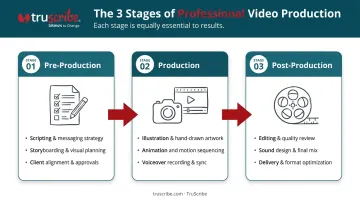
Every professional video project — regardless of format, budget, or length — moves through three stages: pre-production, production, and post-production. Skipping or rushing any one of them creates problems downstream, usually expensive ones.
Pre-Production: Planning for Success
Pre-production is where the most consequential decisions happen. Before a single frame is captured or drawn, you need clear answers to:
- What is this video supposed to accomplish? (awareness, training, conversion, onboarding)
- Who is the audience?
- What format fits the goal — live-action or animation?
The more precisely these are defined upfront, the smoother every subsequent step becomes. Vague briefs are the single biggest source of costly mid-project changes.
Core pre-production deliverables every beginner should understand:
- Written brief or creative concept — Defines the goal, audience, tone, and format
- Script — Includes dialogue, voice-over cues, and visual direction; sets the entire production in motion
- Storyboard — Maps what viewers will see scene by scene, preventing miscommunication during animation or on set
Even rough versions of these documents matter. A one-page brief that everyone signs off on before work starts prevents the kind of scope creep that derails timelines and budgets.
Budget and timeline planning also happen here. Most corporate video projects take 4–8 weeks from concept to delivery for standard work, with complex projects — multiple locations, extensive animation, or a video series — requiring 10–12 weeks or more, according to Lemonlight's 2025 production benchmark. Budget determines crew size, location feasibility, and whether live-action or animation is the more practical choice.
Production: Capturing Your Content
For live-action video, production means the physical shoot — setting up lighting, audio, and cameras, coordinating talent, and following a call sheet to stay on schedule. For animated video, this phase involves illustration, asset creation, and motion design rather than a camera crew.
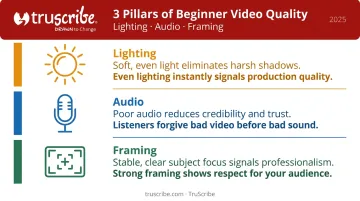
Either way, three technical factors have the biggest impact on whether the final product looks and sounds credible:
The three pillars that most affect beginner video quality:
- Lighting — Soft, even light eliminates harsh shadows and signals professionalism. Harsh overhead lighting or a backlit window does the opposite.
- Audio — This is where most beginners underestimate risk. Research across three controlled experiments with 593 participants found that low-quality audio reduced perceived credibility, trustworthiness, and memory for key information. A basic external microphone is a low-cost fix that pays off immediately.
- Framing — Stable shots with clear subject focus communicate intentionality. Shaky or cluttered frames don't.
Post-Production: Turning Footage Into a Finished Video
Post-production assembles everything into the finished product. The typical workflow:
- Organize and review raw footage or animation assets
- Rough-cut the narrative structure
- Add music and sound effects
- Complete color correction and grading
- Export the final file in the required formats
One thing surprises most beginners: post-production usually takes longer than the shoot itself. Lemonlight benchmarks filming at 1–3 days and post-production at 2–4 weeks. Plan accordingly.
Distribution decisions should be locked in before post-production begins, not after. Different platforms require different aspect ratios, file formats, and video lengths — and editors need to know where the video will live (website, LinkedIn, YouTube, internal LMS, paid ads) before they finalize the cut.
Types of Business Videos and How to Choose
Common Business Video Formats
| Video Type | Best For |
|---|---|
| Brand / company video | Building awareness and emotional connection |
| Product or service video | Demonstrating features, driving purchase decisions |
| Testimonial video | Building trust through real customer stories |
| Training / onboarding video | Improving knowledge retention, reducing repetitive explanations |
| Explainer / animated video | Simplifying complex processes, technical concepts, or policy information |
Why Animation Works Differently for Complex B2B Topics
For organizations that need to explain abstract, technical, or layered information — think compliance training, enterprise software, healthcare procedures, or financial products — animation outperforms live-action. The advantage is cognitive, not aesthetic.
Live-action video can show a person talking about a concept. Animation can actually build the concept visually, step by step, in a way that mirrors how the brain constructs understanding.
TruScribe's Scribology method applies this directly. Rather than relying on templates or fast-cut motion graphics, the approach uses sequential hand-drawn visuals to guide viewer attention with precision — revealing information progressively so the brain can process each idea before the next arrives.
Research on progressive drawing found significant retention and transfer gains compared to static visuals, supporting the mechanism behind this approach. That's why organizations like Medtronic, Fidelity, and Siemens have used it to communicate content where misunderstanding carries real consequences.
A Simple Decision Framework
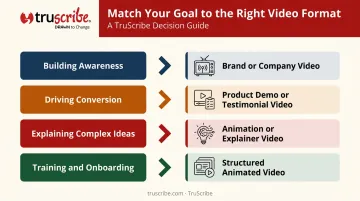
Match the video type to the business goal:
- Building awareness → Brand or company video
- Driving conversion → Product demo or testimonial video
- Improving comprehension of complex ideas → Animation or explainer video
- Employee training or onboarding → Structured video with clear narrative progression, often animated
Essential Production Tips for Beginners
Four principles separate beginner projects that come in on time and on budget from those that don't:
- Script before anything else. A clear script keeps the video on time, on message, and within budget. A practical rule of thumb: roughly two words equals one second of finished video (about 120 words per minute at a conversational pace). Script length determines video length before you touch a camera.
- Keep the first project simple. One location, minimal talent, a focused message. Complexity can be added as experience grows. Ambitious first productions rarely go as planned — and the cost of that lesson adds up fast.
- Build in revision rounds at every stage. Script review, rough cut feedback, and final approval are not optional steps. Unexpected changes mid-production are one of the most common causes of budget overruns and missed deadlines. Structure the feedback process before production begins, not after.
- Plan for distribution before you shoot. The target platform — LinkedIn, a company intranet, YouTube, a landing page — should shape decisions about length, tone, aspect ratio, and production polish from the start. A vertical 60-second video for Instagram is a fundamentally different project from a 3-minute widescreen explainer for an LMS platform.
In-House vs. Outsourced Video Production
The In-House Approach
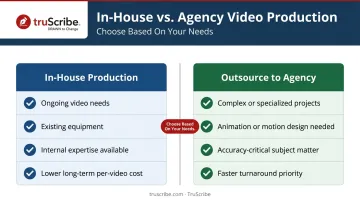
Organizations with ongoing video needs, capable internal teams, and existing equipment can reduce per-video costs over time by producing in-house. The tradeoff: the upfront investment in equipment, software, and skilled personnel is significant, and quality is constrained by available expertise.
Vidyard estimates equipment costs ranging from around $200 for a smartphone-based kit to $9,000–$10,000 for an advanced camera and lighting setup. That's gear only — salaries, software, training, and overhead add substantially to the real cost of an in-house capability.
According to Wistia's 2025 State of Video Report, 36% of companies use a dedicated in-house video or creative team, while 14% rely on a video production agency and 14% on freelancers.
When to Outsource
Outsourcing makes more sense when:
- The project is complex or technically specialized
- The format requires skills the internal team doesn't have (animation, motion design, professional voiceover)
- Consistent quality and faster turnaround are priorities
- The subject matter — compliance, healthcare, financial services — demands accuracy alongside clarity
A good production partner handles the full process: scripting, creative direction, execution, and delivery. Internal teams stay focused on their core work. For B2B organizations communicating complex ideas — training programs, product launches, compliance communications — a specialist like TruScribe combines production quality with a neuroscience-backed approach to structuring and delivering the message clearly.
The Hybrid Model
Many organizations land somewhere in the middle: handling early-stage planning internally (goal-setting, scripting inputs, stakeholder approvals) while outsourcing technical execution to a production company or animation studio. TruScribe, for instance, accepts client-supplied scripts and works from drafts, outlines, or existing materials — meaning an internal team can retain strategic control while handing off the animation and production work.
Frequently Asked Questions
What are the basics of video production?
Video production is a structured process covering three phases: pre-production (planning and scripting), production (filming or animation), and post-production (editing and finishing). Understanding these basics helps beginners set realistic expectations and avoid the most common sources of cost overruns and delays.
What are the three stages of video production?
Pre-production covers planning, scripting, storyboarding, and budgeting. Production involves capturing footage or creating animation assets. Post-production handles editing, sound mixing, color correction, and export. Each stage builds directly on the one before it.
How much does video production cost for a business?
Costs vary widely. Clutch marketplace data reports a $42,280 average project cost across listed agencies, while many projects come in under $10,000. Agency hourly rates typically run $100–$149, with the final figure depending on scope, format, and complexity.
What is the difference between live-action and animated video production?
Live-action involves filming real people, locations, and objects. Animation uses illustrated or digital visuals built in post-production. For abstract, technical, or complex B2B concepts that cameras can't easily show, animation — including whiteboard animation — typically communicates more clearly.
How long does it take to produce a business video?
Most professional business videos take 4–8 weeks from kickoff to delivery for standard projects. Complex work — extensive animation, multiple locations, or a video series — can take 10–12 weeks or longer. TruScribe delivers standard whiteboard explainer videos in 20 working days, with expedited options available.
Do I need professional equipment to get started with video production?
No. Beginners can start with a modern smartphone, a basic external microphone, and good natural lighting. For animated video, no camera equipment is needed at all — the entire production is digital. Start simple and upgrade as your needs grow.