But the format's effectiveness isn't automatic. Poorly structured scripts, misaligned audio-visual timing, and weak audio quality all actively reduce comprehension rather than improve it. The gap between a narration video that works and one that gets abandoned halfway through usually traces back to decisions made before recording even begins.
This guide covers what you need before you start, a step-by-step creation process, the variables that most affect quality, and the mistakes worth avoiding.
Key Takeaways
- The script is the single highest-leverage input — weak scripts cannot be rescued in post-production
- Visual and audio tracks must complement each other, not duplicate it
- Script approval must happen before recording begins; post-approval changes require costly re-records
- Pacing, voice tone, sync timing, and audio quality each independently determine whether viewers finish the video
- Most narration video failures originate in skipped planning, not poor execution
How to Create a Narration-Style Video: Step by Step
Step 1: Write a Purpose-Driven Script
Every narration script needs a single, clear objective and a defined audience. Before writing a word, answer: what does the viewer need to understand, feel, or do by the end? Corporate narration scripts prioritize clarity and actionability — they're not storytelling exercises.
Practical script guidelines:
- Use short sentences written for the ear, not the eye
- Keep tone conversational — avoid dense paragraphs that sound like policy documents
- Flag visual transitions in the script itself (for example: [Cut to: process diagram])
- Remove jargon unless your audience uses it daily
As a planning benchmark, most professional narration runs at roughly 125–150 words per finished minute — though this is a production convention rather than a research-verified optimum. At that pace, a 2-minute video needs approximately 250–300 words of script, not 500.
Step 2: Plan Visual-Narration Synchronization
Before recording, map each narration beat to a specific visual moment. A basic storyboard or annotated shot list works — the goal is ensuring audio and visuals are designed together, not assembled separately.
The cognitive principle at work is dual coding, introduced by Allan Paivio in 1971: verbal and visual information are processed through functionally independent but connected channels. When both channels receive complementary information simultaneously, comprehension and retention improve.
Mayer's research confirms this — simultaneous words and pictures produced better transfer than successive presentation in 8 of 8 tests (median d = 1.31).
When narration describes something that appeared three seconds ago — or won't appear for two more seconds — the brain works harder and retains less.
Step 3: Record or Source the Narration Audio
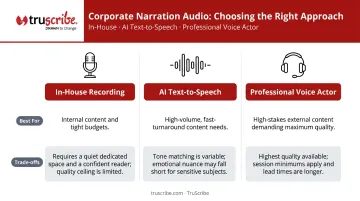
Three realistic options exist for corporate video creators:
| Option | Best For | Trade-offs |
|---|---|---|
| In-house recording | Internal content, tight budgets | Requires quiet space, quality mic, confident reader |
| AI text-to-speech | High-volume, fast-turnaround needs | Modern TTS can perform comparably on some learning measures; tone matching varies |
| Professional voice actor | High-stakes, long-lifecycle, external-facing content | Highest quality and tonal authenticity; union session minimums start around $550/hour |
For in-house recording, setup decisions have a direct impact on output quality:
- Record in the quietest space available — a closet with soft furnishings outperforms a conference room
- Use a cardioid-pattern microphone to reduce pickup from behind the speaker
- Position the mic 6–12 inches from the speaker's mouth, slightly off-axis
- Record line-by-line rather than continuous takes — easier to replace individual errors
- Capture a reference recording first to establish target tone before the full session
Step 4: Edit and Integrate Narration with Visuals
Import audio into editing software and align narration timestamps with visual transitions. The most common error at this stage is rushing the pacing. Decisions made in the edit room determine whether key points land clearly or blur together.
Final quality checklist before export:
- Listen through headphones to catch inconsistencies invisible on speakers
- Check volume balance between narration and any background music
- Verify no narration line extends past its corresponding visual segment
- Review audio cuts for abruptness — clean, inaudible transitions between recorded lines
What You Need Before You Start
Preparation determines output quality. Teams that skip the planning phase consistently produce videos that require expensive re-work.
Equipment and Environment Requirements
For acceptable professional audio quality, you need:
- A cardioid microphone (condenser models work well where ambient noise is low; dynamic cardioids handle noisier environments better)
- A recording environment meeting a noise floor no higher than -55 dBFS — the threshold used by the World Voices Organization for professional studio approval
- Video editing software with a multi-track timeline capable of handling separate audio and video channels
You don't need a professional studio, but you do need to control your acoustic environment. Soft furnishings absorb reflections. Hard walls and open rooms create echo that's difficult to remove in post.
Script and Visual Asset Readiness
Before recording begins, two assets need to be locked in:
- Approved final script — even minor line changes after recording require re-recording segments, creating tone and volume inconsistencies between takes that are hard to edit out
- Visual assets or a draft storyboard — having these ready before audio recording allows timing to be planned accurately from the start
Skill and Knowledge Readiness
Effective narration video production requires scriptwriting competence, basic audio recording knowledge, and video editing familiarity. For organizations that lack these internally, partnering with a specialized studio closes the gap without compromising output quality.
TruScribe, for example, uses its neuroscience-backed Scribology process to engineer narration and visuals together — coordinating timing, visual reveal, and content structure so each element reinforces the other. That kind of integrated production discipline is difficult to replicate without dedicated expertise.
Key Variables That Determine Narration Video Effectiveness
Even technically competent narration videos underperform when creators overlook the controllable variables most directly tied to whether viewers stay, absorb the message, and act.
Narration Pace and Rhythm
Pace controls cognitive load. Too fast, and viewers can't process the information before the next point arrives. Too slow, and attention drifts before the idea lands.
Corporate training content generally benefits from a more deliberate pace than promotional content — the audience is processing to learn, not consuming for interest. As a practical reference, most conversational English runs around 150 words per minute; training narration is typically delivered slightly below that rate.
Voice Tone and Register
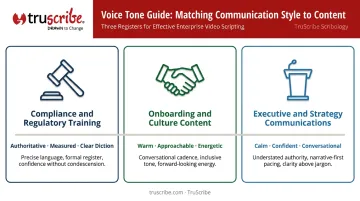
Voice tone signals authority, warmth, or urgency before a single sentence is consciously processed. Mismatched tone undermines credibility: an overly casual voice for compliance training, or a stiff delivery for a culture video, creates friction the viewer may not be able to articulate but will feel.
Match register to purpose:
- Compliance and regulatory training — authoritative, measured, clear diction
- Onboarding and culture content — warm, approachable, energetic without being performative
- Executive and strategy communications — calm, confident, conversational
Visual-Audio Timing Alignment
Mayer's temporal contiguity research is direct on this: simultaneous presentation of words and relevant pictures consistently outperforms sequential presentation. When narration describes a concept half a second before or after the corresponding visual appears, the brain processes them as separate inputs rather than a unified message — and comprehension drops.
This is the variable most commonly sacrificed under production time pressure. Before locking picture, do a pass where you mute the narration and confirm each visual change lands within one second of the corresponding spoken cue.
Audio Recording Quality
Poor audio quality affects more than viewer comfort: it shapes how they judge the content itself. Research by Newman and Schwarz found that identical conference presentations delivered with degraded audio received measurably less favorable evaluations than the same content in clean audio. Viewers tolerate imperfect visuals far more readily than poor sound.
These recording conditions are the most common culprits:
- Background noise bleeding through during pauses
- Room echo from hard, reflective surfaces
- Inconsistent volume levels between takes
- Microphone artifacts from poor gain settings or proximity
Address them in the recording environment, not the edit room.
Common Mistakes When Creating Narration-Style Videos
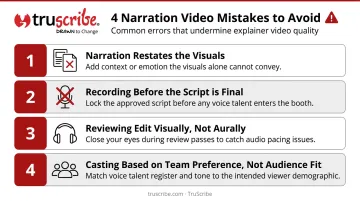
These four mistakes appear across productions at every budget level — each one is fixable once you know what to listen for.
Narration that restates the visuals. If the screen shows a process diagram and the narration reads it aloud, neither channel adds value. Narration should provide interpretation or forward momentum — what the visual means, not what it depicts.
Recording before the script is final. Even a single revised line creates a problem: replacement audio rarely matches the original in tone, volume, or room sound. Those inconsistencies survive editing and signal amateur production to attentive listeners.
Reviewing the edit visually but not aurally. Creators typically review final cuts watching the screen. A separate pass — headphones only — catches background noise, abrupt cuts, and volume spikes that are invisible in the editing interface but immediately obvious during normal viewing.
Casting voice talent based on team preference, not audience fit. A younger frontline workforce may disengage from a formal executive-style narrator. A technical audience may find overly enthusiastic delivery unconvincing. Audience profile should drive the casting decision, not internal consensus.
When to Use Narration-Style Videos (and When Not To)
Narration-style videos are most effective when:
- The subject matter is conceptually dense and needs guided explanation
- The audience is time-constrained and needs information delivered, not discovered
- Content will be consumed across multiple environments, including mobile or audio-only contexts
- Message clarity is non-negotiable — corporate training, onboarding, product explainers, change management
The format becomes less effective when:
- The visual experience itself is the content (product demos, software walkthroughs where screen action speaks for itself)
- On-camera presence is central to credibility (executive announcements, testimonials)
- Content is ultra-short social video where narration adds length without proportional value
When retention and behavior change are measurable goals — or when the video will be deployed at scale across a large workforce — the synchronization between narration and visuals becomes a production requirement, not a nice-to-have. TruScribe's Scribology methodology, applied across 5,000+ whiteboard videos for clients including Microsoft, NASA, and Walmart, is built around this principle: every visual reveal is timed to the narration, not layered on afterward.
Beyond whiteboard animation, several other formats are worth evaluating:
- Screen-capture explainers — effective for software tutorials; weaker for conceptual content
- Live-action with embedded captions — strong for high-trust contexts; requires on-camera talent
- Presenter-led talking-head video — good for culture content; less effective for complex instruction
The right choice depends on how tightly your content relies on narration to carry meaning — and how much precision that narration-visual sync requires.
Frequently Asked Questions
Frequently Asked Questions
What is a narration video?
A narration video uses a voiceover or spoken commentary delivered over visuals to guide the viewer through a concept, story, or process. It differs from videos where an on-screen speaker delivers the message directly. The narrator is heard but never seen on screen.
How long should a script be for a narration-style video?
A common production benchmark is approximately 125–150 words per finished minute, though this varies by delivery pace. For most corporate narration, 90 seconds to 3 minutes is the practical sweet spot for completion rates; beyond that, engagement tends to drop as length increases.
What makes a good narrator voice for corporate training videos?
Clear diction, controlled pace, and a tone that signals competence without sounding distant. The best narrator voice matches the audience's expectations for authority and approachability, not simply the voice the production team finds most impressive.
Should narration and visuals say the same thing, or should they complement each other?
Complement each other. Narration provides context, interpretation, and emotional framing. Visuals reinforce and extend the meaning. When both channels say the same thing, you've cut the information value of each in half.
What is the difference between narration and voice-over?
Voice-over is the broader technical term for any off-screen audio track. Narration specifically refers to voice-over that tells, guides, or explains a story or concept. All narration is a form of voice-over, but not all voice-over is narration.
How do I avoid narration that sounds unnatural or robotic?
Three practices make the biggest difference:
- Write for the ear, not the page — shorter sentences, contractions, and natural rhythm
- Have the narrator review the footage before recording to internalize the visual pacing
- Build in intentional pauses rather than leaving timing decisions to the editor