Introduction
Picture a prospect who's done everything right. They've read your homepage, downloaded the brochure, maybe even skimmed a case study. And yet they still can't visualize how your product actually works in practice.
That gap between describing something and showing it is exactly what a video demo closes.
According to a 2025 Gartner survey of 632 B2B buyers, 61% now prefer a rep-free buying experience. Buyers want to self-educate on their terms — which makes an on-demand video demo one of the most valuable assets in your marketing and sales arsenal.
This guide covers everything you need to know: a clear definition of video demos, the main types, real-world examples, and the best practices that separate forgettable demos from ones that actually convert.
Key Takeaways:
- A video demo answers "how does this work?" — not just "what is this?"
- Five main formats exist, each suited to different products, audiences, and budgets
- Open with a problem in the first 10–15 seconds, not a feature
- Demos under 3 minutes outperform longer ones for most top-of-funnel placements
- Sequential visual storytelling drives comprehension and retention more than screen recordings alone
What Is a Video Demo?
A video demo is a short-form video that shows how a product or service works — demonstrating features, use cases, and value in a way static content cannot replicate. A brochure tells viewers what a product does; a demo shows them.
Demo vs. Explainer: A Common Confusion
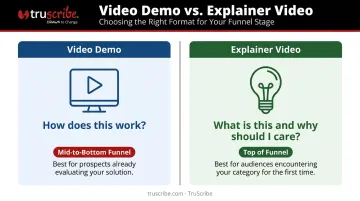
These two formats get conflated often, but they serve distinct purposes:
| Format | Core Question Answered | Best Funnel Stage |
|---|---|---|
| Video Demo | How does this work? | Mid-to-bottom funnel |
| Explainer Video | What is this and why should I care? | Top of funnel |
Both are valuable. But mixing them up — producing a feature walkthrough when buyers need a high-level overview, or vice versa — is one of the most common reasons demos don't convert.
What Every Effective Video Demo Includes
Regardless of format or industry, strong video demos share four structural elements:
- An overview of core features or capabilities
- A demonstration of real use cases (not hypothetical ones)
- A walkthrough of the user experience or workflow
- A clear statement of the primary outcome the viewer can expect
Who Actually Uses Video Demos
The assumption that video demos are a SaaS-only tool is outdated. B2B organizations across many industries rely on them, especially when a static screenshot cannot convey how a product actually works:
- Healthcare and life sciences
- Financial services and fintech
- Manufacturing and industrial sectors
- Professional services
For complex offerings without a traditional user interface, a visual walkthrough is often the only format that does the job.
Types of Video Demos
The right format depends on your product, your audience, and what you're asking viewers to understand. Here are the five main types.
Recorded Screen Walkthroughs
The most common format for software products: a screen capture, usually paired with voiceover, that guides viewers through an interface step by step. These range from informal screen shares used in personalized sales outreach to polished, scripted product tours built for website placement. The low setup cost makes them the default starting point for most teams.
Highly Produced Product Demo Videos
Scripted, professionally edited videos that combine screen recordings, live-action footage, motion graphics, and narration. Higher production investment, but built to serve large audiences over time. When brand impression matters as much as product clarity, this format earns its cost.
Animated and Whiteboard Animation Demos
Animated demos are especially powerful when a product has no traditional user interface — or when the concept being demonstrated is abstract, technical, or multi-step.
Whiteboard animation uses sequential visual storytelling to build understanding piece by piece. Rather than presenting a completed image all at once, the progressive drawing technique guides the viewer's eye with precision, revealing one idea before introducing the next. Peer-reviewed research supports this approach: studies published in educational research settings have found that progressive drawing can improve comprehension and retention compared to static or pre-built visual formats.
TruScribe's Scribology methodology applies this principle to B2B communication, using sequential drawing to direct attention, reduce cognitive load, and build mental models step by step. It's particularly well-suited for industries where the subject matter resists a screen recording:
- Healthcare and life sciences: biological processes, clinical workflows, regulatory pathways
- Financial services: instruments, compliance frameworks, multi-step transactions
- Manufacturing and industrial: systems, equipment operation, supply chain logic

Live and Recorded Sales Demos
Real-time product walkthroughs conducted over video call, typically tailored to a specific prospect. The 1:1 format builds rapport but doesn't scale. Recording and repurposing the strongest live demos lets sales teams extend their reach without requiring a fresh walkthrough for every conversation.
Interactive Video Demos
A hybrid format that blends video with clickable, branching elements. Viewers can explore at their own pace, jump to relevant sections, or follow different paths based on their role. More resource-intensive to build, but they remove the friction of sitting through content that doesn't apply to a specific viewer.
Key Benefits of Video Demos
Scalability
A recorded demo can be watched by an unlimited number of prospects at any hour, without a sales rep present. McKinsey research across nearly 4,000 B2B decision-makers found that one-third prefer digital self-service at any given buying stage — including supplier research and product evaluation. An on-demand demo supports that preference directly.
Trust and Credibility
Showing a product in action is more convincing than describing it. This matters most for complex or unfamiliar offerings, where skepticism is the default. A prospect who watches a demo doesn't have to imagine how something works — they see it play out in real conditions, which builds confidence that a product description never quite achieves.
Reduced Friction at Every Funnel Stage
The right demo, placed at the right moment, shortens buying cycles:
- Homepage — A 60–90 second demo clarifies your value proposition for cold visitors
- Solutions or product pages — Feature-level demos help prospects in active evaluation
- Sales outreach — Use-case demos address specific objections and accelerate decisions
Video Demo Examples: What Good Looks Like
Airtable
Airtable maintains a dedicated demo hub built around workflow demonstrations rather than feature inventories. The video opens with a broad, recognizable use case and narrows to specifics as viewer understanding builds. That structure — general to specific, fast-moving, workflow-centered — is the right template for a complex platform with multiple user types.
Nespresso Professional
Nespresso's commercial machine demos focus on operational simplicity rather than technical specification. The videos show a workflow — someone completing a task in a realistic environment — without narrating every feature. If your product looks effortless in use, show that effortlessness directly. Narration is optional; the visual does the convincing.
Animated Demos for Abstract or Intangible Offerings
For organizations selling something intangible — a consulting methodology, a pharmaceutical process, an industrial system — there's no screen to record. Here, animated or whiteboard demos do the heavy lifting. TruScribe, for example, has produced demos for clients including Medtronic, Siemens, and Fidelity, where the challenge isn't navigating an interface — it's making an abstract concept visually comprehensible to a non-expert buyer.
What These Examples Share
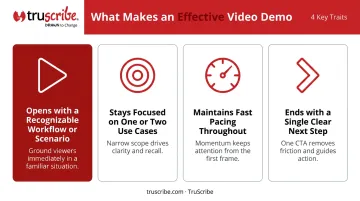
Despite different formats and industries, the strongest demos consistently do four things:
- Open with a workflow or scenario the viewer recognizes immediately
- Stay focused — one or two use cases, not every feature
- Keep pacing fast enough that the viewer never feels like they're waiting
- End with a single, clear next step
Best Practices for Creating Effective Video Demos
Start With the Problem, Not the Product
The first 10–15 seconds should anchor the viewer in a pain point or goal they recognize — not in a feature tour. Viewers stay engaged when they see their own situation on screen. Opening with "Here's what our dashboard looks like" before the viewer understands why they should care is one of the most common demo mistakes.
Keep It Short and Purposeful
Vidyard recommends 2 minutes as a general ideal for most demo videos, with a 90-second version useful when a prospect is hesitant to commit to a full walkthrough. Wistia's analysis of 13 million videos found that product videos under one minute maintain roughly 50% average engagement, with tutorials and explainers in the 1–5 minute range holding similar rates.
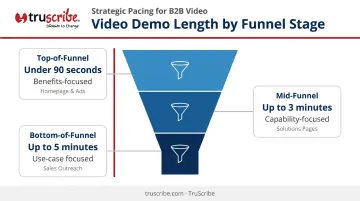
Practical guidance by placement:
- Top-of-funnel (homepage, ads): Under 90 seconds, benefits-focused
- Mid-funnel (solutions pages): Up to 3 minutes, capability-focused
- Bottom-of-funnel (sales outreach): Up to 5 minutes when addressing a specific use case or objection
Use Visuals That Guide Attention Intentionally
Effective demos direct the viewer's eye to what matters most at each moment. Several techniques help with this:
- Whiteboard animation and motion graphics often outperform static screenshots for complex topics because they reveal information progressively
- Sequential visual reveals — central to TruScribe's Scribology method — align with how the brain processes new information: one idea at a time, without visual competition
- On-screen annotations and highlights draw attention to specific UI elements or data points as the narrator references them
Write and Rehearse a Script
Improvised demos run long, include filler, and leave key points uncovered. A script ensures every second serves the message and that narration matches what's on screen. For any demo going to a broad audience, skipping the script almost always shows — and costs you the viewer's attention before the midpoint.
End With One Clear Call-to-Action
Choose a single next step — book a demo, start a trial, download a guide — and make it visually prominent. Multiple CTAs dilute intent. A viewer who reaches the end is already interested. One clear direction converts that interest into action; four options turn it into hesitation.
Frequently Asked Questions
What is a demo video?
A demo video is a short video that shows how a product or service works, used to educate prospects and support buying decisions. Unlike written descriptions, it lets viewers see the product in action — removing ambiguity and building confidence before a sales conversation begins.
What is an example of a demo?
A software company showing a walkthrough of its platform, or a B2B firm using whiteboard animation to explain a complex service process. Demos vary widely by format and industry — what matters is that they show the thing working, not just describe it.
How long should a video demo be?
Most demos perform best under 3 minutes. Top-of-funnel placements work well around 90 seconds; deeper product walkthroughs can extend to 5 minutes when complexity and viewer intent justify it. When in doubt, cut.
What is the difference between a demo video and an explainer video?
Demo videos answer "how does this work?" for prospects already considering a purchase; explainer videos answer "what is this and why should I care?" for earlier-stage awareness. Both are useful — just at different points in the buyer's journey.
Where should I put a video demo on my website?
The placement depends on the demo's scope: homepages suit high-level overviews under 90 seconds, product or solutions pages work for feature-specific walkthroughs, and landing pages are right for campaign-specific use cases where the visitor arrives with a defined intent.
Do I need a big production budget to make a good video demo?
Not necessarily. Screen recordings are low-cost and work well for software demos, while animated or whiteboard demos require a professional studio but are often the stronger choice for complex or abstract offerings where a screen recording alone would leave viewers with more questions than answers.