Introduction
Most video projects don't fail in editing. They fail weeks earlier, when someone green-lights a shoot without a clear accounting of what it actually costs. A single-line budget — "we have $50,000 for this video" — tells you almost nothing about where that money goes or when it runs out.
A film budget template solves this by forcing scope clarity before spending begins. Marketing teams use them to get executive sign-off. L&D leads use them to justify training video investments. Production companies use them to protect their margins. Project managers use them to keep multi-vendor shoots from spiraling.
This guide covers what to include in a video production budget template, how to build one correctly, and how to manage it through to delivery, whether you're planning a live-action shoot or an animation-based project.
Key Takeaways
- Cover all four phases: pre-production, production, post-production, and distribution
- Build in a 10% contingency on top of your estimated line item total
- Define script, schedule, and delivery format before creating any cost estimates
- Live-action and animation have different cost structures — match your template to the format you're producing
- Treat your budget as a live document, not a one-time estimate
When Should You Use a Film Budget Template?
Short answer: any time a video project involves more than one vendor, more than one day, or more than one decision-maker reviewing costs.
The template isn't reserved for large shoots. A two-minute corporate training video benefits from structured itemization because it forces the team to define scope before anyone commits to a vendor quote. That clarity prevents the most common budget failure mode: realizing mid-production that a cost category was never accounted for.
Three scenarios where skipping a template causes problems:
- "Total budget: $30,000" with no line-item breakdown — no one knows what's included or what happens when one category runs over.
- Building the budget after crew or equipment is already booked — at that point, it's cost-tracking, not planning.
- Forcing a feature film template onto a short corporate video — mismatched categories create confusion rather than clarity.
Once you know a template is warranted, the next step is choosing one structured for your specific production type — not just the closest format available.
What You Need Before Building Your Video Production Budget
Budget accuracy depends on information that exists before any numbers do. Don't open a spreadsheet until you have these three inputs:
- A finalized script or creative brief — This determines scene count, location needs, cast size, and post-production complexity. Every major cost driver traces back to what's on the page.
- A confirmed shoot timeline or schedule — Day count controls crew rates, equipment rental periods, and facility bookings — one extra shoot day can add thousands in costs across multiple line items simultaneously.
- A defined delivery goal — Whether the video is for internal training, a social campaign, or broadcast determines post-production requirements, licensing needs, and deliverable formats — the output shapes the budget as much as the shoot itself.
What to Include in a Video Production Budget Template
A complete template organizes all expenses into line items by production phase. The core categories apply to both live-action and animation — though the specific line items within each phase differ significantly depending on production type.
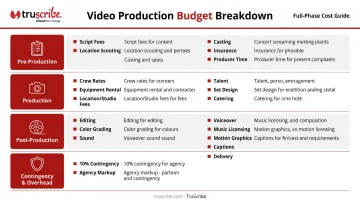
Pre-Production Line Items
- Script development or creative brief fees
- Location scouting and permits
- Casting or talent sourcing
- Production insurance
- Project management and producer time
Production Line Items
- Crew day rates (director, cinematographer, sound engineer, lighting technician)
- Equipment rental (cameras, lenses, lighting, audio)
- Location or studio fees
- Talent and actor fees
- Set design and wardrobe
- Meals, catering, and transportation
Post-Production Line Items
- Editing
- Color grading
- Sound design and mixing
- Voiceover recording
- Music licensing (note: existing recordings typically require both a synchronization license for the composition and a master-use license for the specific recording — budget these separately)
- Motion graphics or animation work
- Captions, localization, and accessibility formatting
- Final delivery and versioning
Contingency and Overhead
Always include a dedicated contingency line. StudioBinder's professional budgeting guide identifies 10% as a solid contingency amount for most productions — particularly when individual line items already include some padding. The contingency is not a bonus pool — it covers real costs: equipment failure, weather delays, location changes, or a licensing fee that exceeds the original quote.
If an agency or studio overhead markup applies, add it as its own line item rather than absorbing it into another category.
How to Build Your Video Production Budget Step by Step
The most common budgeting mistake is setting a total number first and then trying to make line items fit underneath it. That approach guarantees underfunding at least one phase. The correct sequence runs in the opposite direction: scope first, cost second.
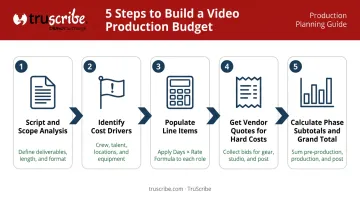
Script and Scope Analysis
Start with a thorough read of the script or creative brief. Flag anything that drives cost disproportionately — these are the items most likely to cause overruns when underestimated:
- Complex or remote locations requiring travel and permits
- Multiple shoot days with large crew calls
- Custom animation or motion graphics sequences
- Licensed music or original score composition
- Large or specialty cast with union considerations
For shoot-day estimation, a useful planning range from No Film School's scheduling guide is roughly 1 script page per day on major productions, up to 5 pages per day on independent work. For corporate video, treat page count as a starting envelope only. A one-page interview setup shoots faster than a one-page scripted scene requiring multiple actors, product inserts, and camera moves. Always break the script into setups and locations before estimating shoot days.
Populating Line Items with Cost Estimates
Apply one consistent formula across crew, equipment, and facilities:
Number of days (or hours) × unit rate = line item cost
For hard costs — equipment rental, location permits, licensed music — get actual vendor quotes rather than estimating generically. These are the line items most likely to create budget gaps when assumed rather than confirmed.
Group line items by phase and calculate subtotals for each phase before tallying a grand total. Phase-level subtotals make stakeholder review faster and immediately show which phase is consuming the most resources.
Setting Phase Allocation Percentages
Once you have phase subtotals, the next question is whether your allocation looks right. No universal percentage split is mandated by industry bodies — the AICP's commercial bid form, the de facto standard for commercial production budgeting since 1975, provides category structures but deliberately leaves financial percentages to each producer.
What the research does support clearly: post-production is the phase teams most consistently underfund. Editing, sound mixing, color grading, graphics, review rounds, and versioning add up quickly — and cutting corners here degrades the final product regardless of how well the shoot went.
Build post from actual deliverable scope instead of back-calculating from a percentage:
- Editorial days and review cycles
- Music licensing or composition
- Captions and accessibility requirements
- Master file exports and version count
Each of these has a real cost. Quantify them before you lock the budget.
Best Practices for Managing Video Production Costs
Update the budget in real time. A budget set at kickoff and never revisited is not a budget — it's a wish. Track actual spend against estimated line items at each phase gate and flag variances before they compound.
Prepare it as a stakeholder communication tool. Include a clear summary view with phase totals and contingency visible at a glance. Annotate the assumptions behind key estimates. Build in a formal approval step before any expenditure is committed. If the scope changes, AICP's guidelines are direct: changes in project specifications become billable change orders, and those overages should be negotiated and approved before the additional work begins.
Recognize when animation simplifies the cost structure. For B2B organizations producing training, onboarding, or internal communications videos at scale, animation-based formats eliminate many of the largest live-action cost variables — equipment rental, location fees, on-set crew, catering. The result is a more predictable cost structure where scope, timeline, and per-deliverable costs can be defined upfront.
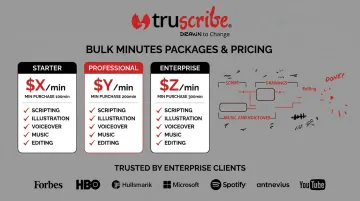
TruScribe's whiteboard animation model is built around this predictability. Our Bulk Minutes Packages — ranging from $1,625 to $2,300 per finished minute depending on volume — consolidate scripting, illustration, voiceover, music, editing, and client review into a single defined rate.
For budget planners managing multiple videos across departments, this replaces per-project negotiation with predictable, per-unit pricing. Organizations like Walmart, Merck, and Microsoft have used this approach to scale corporate video production without juggling multiple independent vendors.
Conclusion
A film budget template is a scope-control document as much as a financial one. The discipline of itemizing forces every decision about locations, crew, talent, and post-production into the open before money moves. That's where most overruns are actually prevented.
Treat it as a living document from kickoff through final delivery. A well-maintained budget protects the quality of the work and the financial health of the production — and keeps every stakeholder aligned on the same version of the truth throughout the entire project.
Frequently Asked Questions
How do you budget a film production?
Start with a script or scope analysis, then break all expenses into line items across pre-production, production, post-production, and distribution. Apply a days × unit rate formula to each item, confirm hard costs with vendor quotes, and add a 10% contingency on top of the total. Never set a grand total before itemizing.
What are the four types of budgeting?
The four common approaches are:
- Incremental — adjusting a prior budget by a percentage
- Zero-based — rebuilding from scratch and justifying every expense
- Activity-based — working backward from required outputs like shoot days or finished versions
- Value-proposition — retaining spending tied to audience outcomes
For most corporate video projects, activity-based budgeting is the most practical starting point.
What percentage of a video production budget should go to post-production?
No universal percentage exists — the AICP leaves this to each producer's judgment. Build post-production costs from actual deliverable scope: editorial days, review rounds, color, sound, graphics, music, captions, and version count. Post is consistently the most underfunded phase, so estimate it from the bottom up rather than assigning a default percentage.
What should a contingency budget be for video production?
A 10% contingency is the professional rule of thumb cited by StudioBinder's budgeting guide. It covers real unforeseen costs — equipment failure, weather delays, location changes, or licensing fees that exceed estimates. Contingency is a required budget component, not a discretionary reserve.
What is the difference between above-the-line and below-the-line costs?
Above-the-line (ATL) costs cover the major creative leaders — writer, director, producer, and key talent — typically negotiated at fixed rates. Below-the-line (BTL) costs cover the technical workforce: crew, equipment, locations, art, catering, and post-production execution. ATL costs are usually locked early; BTL costs scale with production scope.
How do animation video budgets differ from live-action video budgets?
Animation eliminates most live-action hard costs — no location fees, equipment rental, on-set crew, or catering. In their place are higher creative and production labor costs: design, storyboarding, illustration or animation, and revision cycles. For corporate video, this trade-off typically produces a more predictable cost structure, since animation scope and per-deliverable pricing can be defined before production begins rather than adjusted around on-set variables.